Pantry Inventory List: A Free Printable Template
A pantry inventory list is a sheet with one line for each food you keep in the cupboard: what it is, how much you have, the date on the package, and a box to tick when you need more. That's all it needs. Below is a free one-page printable with those four columns, grouped by category, plus how to fill it in and keep it current, and the same headers for Excel or Google Sheets.
Download the free printable (PDF)
The short version: print the sheet, or copy the headers into a spreadsheet. Fill it in one shelf at a time. Write the amount and the date on the package. Tick "Buy" when you're low. Update it when you unpack groceries and when you finish something, and read it before every shop.
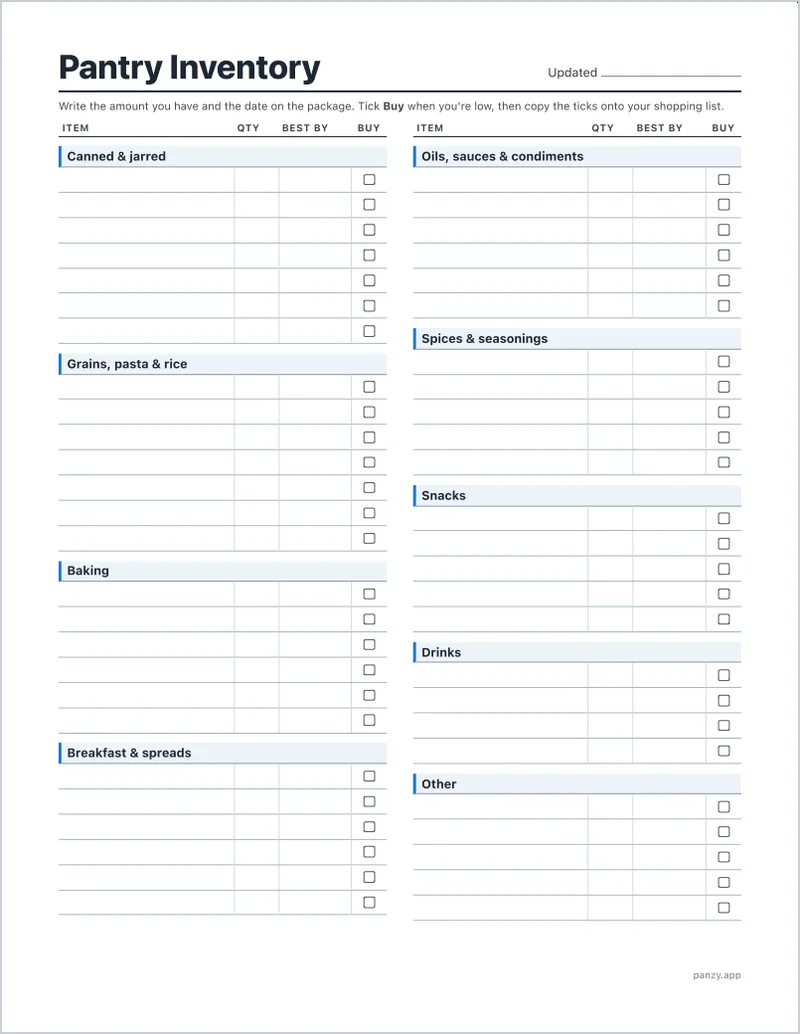
What a pantry inventory list is for
A list answers one question without opening every cupboard: do I have it? That makes it useful at three moments.
- When you write the shopping list. You buy what is actually low, not what you think is low.
- When you plan meals. You can see the three cans of chickpeas and the half bag of lentils and cook around them.
- When you're at the store. If the list comes with you (a photo of the sheet works), you stop buying a fourth jar of cumin.
If you want the bigger picture, our guide to keeping track of food at home covers a whole system for the pantry, fridge and freezer. This post is about the list itself: what goes on it and how to use it.
The columns you need
Keep it to four. Every extra column is one more thing to fill in, and a list that takes too long to update stops getting updated.
| Column | What to write | Example |
|---|---|---|
| Item | Specific enough to find it | Chopped tomatoes |
| Qty | How many, or how full | 3 cans, ½ bag |
| Best by | The date on the package | Mar 2027 |
| Buy | A tick when you're low | ✓ |
Item. "Chopped tomatoes", not "cans". If you keep two kinds, give them two lines.
Qty. Count units for things that come in units (cans, jars, boxes) and estimate for things that don't ("½ bag", "almost empty"). Nobody needs to weigh the rice.
Best by. Copy the date printed on the package. The USDA Food Safety and Inspection Service explains that, except for infant formula, these dates are not required by federal law and are not an indicator of safety: manufacturers use them to show when food is at its best quality. So this column is for spotting what to use first, not for deciding what to throw out. The USDA also notes that cans and boxes typically carry a code of letters and numbers instead of a calendar date. If you can't read a date, leave the box blank. Our guide to Best By vs Use By vs Sell By explains every kind of label.
Buy. Tick it when an item gets low. When you write your shopping list, copy every tick. That one column is what turns an inventory into a shopping list.
You can add a Location column if your food lives in more than one place (a hall cupboard, a garage shelf), or a Unit column if you prefer "3" and "cans" in separate boxes. For a freezer, the columns are a little different (you want the date it went in), and our freezer inventory guide has its own layout.
How to fill it in the first time
Do it one shelf at a time, not by emptying the whole pantry. It takes longer to put everything back than to write it down.
- Start at the top shelf. Take off what's there, write each item under its category, and put it back.
- Group the same thing on one line. Three cans of the same beans are one line with "3", not three lines.
- Write the amount as it is today, including the half-used bags.
- Copy the date from each package, or the earliest one if you have several.
- Tick Buy for anything you're already low on.
- Move to the next shelf.
Skip what you never run out of or never waste. A big bottle of vinegar or a box of salt can stay off the sheet. Start with the food you buy every week or two.
If the shelves are a muddle, it's worth sorting them first. Our guide to organizing your pantry by category uses the same kind of groups as this sheet, so the list and the shelves end up in the same order.
How to keep it current
A list is only useful while it's true. It drifts in two directions: food comes in and food gets used. Update it at both moments.
- When you unpack groceries, add new lines and raise the amounts on the old ones. Keep a pen on the shelf or clipped to the sheet.
- When you cook and finish something, cross out the amount and write the new one, or cross out the line.
- Before every shop, read the whole sheet once. Tick anything that's low, glance at the Best by column for what to use soon, and write your shopping list from the ticks.
When the sheet gets too crossed out to read, print a fresh one and copy the lines over. Once a month or so is also a good moment to check the back of each shelf.
If someone else in the house shops or cooks, put the sheet where they will see it, like the inside of the pantry door, and tell them about the Buy column. A list one person keeps up is still better than none.
Paper, spreadsheet or app?
All three work. Pick the one you will actually update: paper is best in the kitchen, a spreadsheet is best for sorting and planning, and an app is best at the store.
Paper
Print the free PDF and tape it inside the pantry door. Paper is the fastest to update while you cook, and anyone in the house can use it. The downside: it isn't with you at the store unless you snap a photo before you leave.
Excel or Google Sheets
If you'd rather have a spreadsheet, copy these headers into the first row:
Category | Item | Qty | Best by | Buy
Then put one item per row and type the category next to each one (Canned and jarred, Baking, and so on). A few habits make it easier:
- Freeze the header row so the column names stay visible as you scroll.
- Sort by Category to get the same grouping as the printable, or by Best by to see what to use first.
- Filter the Buy column to show only the ticked rows, and that's your shopping list.
- Add Unit or Location columns only if you need them.
A spreadsheet is easiest to keep up on a computer. Some people print it out for the kitchen and update the file once a week.
An app
A pantry app keeps the list on the phone you already take shopping, and it can do some of the updating for you. That's where Panzy comes in.
Section headings to copy
Grouping the list by category means you can find a line in seconds and see at a glance if a whole group is running low. These are the headings on the printable, with a few examples for each:
- Canned and jarred: tomatoes, beans, tuna, soup, olives
- Grains, pasta and rice: rice, pasta, oats, couscous, quinoa
- Baking: flour, sugar, baking soda, baking powder, chocolate chips
- Breakfast and spreads: cereal, granola, peanut butter, jam, honey
- Oils, sauces and condiments: olive oil, vinegar, soy sauce, ketchup, mustard
- Spices and seasonings: salt, pepper, cumin, paprika, stock cubes
- Snacks: crackers, chips, nuts, dried fruit
- Drinks: coffee, tea, juice, bottled water
- Other: anything that doesn't fit, like baby food or pet food
Rename or swap them to suit your kitchen. A family that bakes a lot might split Baking into two; someone who rarely eats cereal can drop Breakfast and give Snacks more lines. If you're stocking a kitchen from scratch, our pantry staples list has ideas for what to put on each.
A pantry inventory list on your phone with Panzy
Panzy is a pantry inventory app for iPhone. It keeps the same kind of list, with a few things paper can't do:
- The same columns. Each item has a name, a quantity and unit, a category, a storage location and an expiration date.
- Fast first count. Scan a barcode and the product details fill in from the Open Food Facts database.
- Quick updates. Tap + or − on an item to change the amount while you cook or unpack.
- A built-in Buy column. Set a low-stock level on an item and it's labeled Low Stock when you get down to it. With Panzy+, low items go onto your shopping list automatically.
- Search and filter. Type a name to check if you have something, or filter the list by category or location.
- Dates. Items close to their expiration date are labeled Expiring Soon. With Panzy+ you can also get a reminder a chosen number of days before.
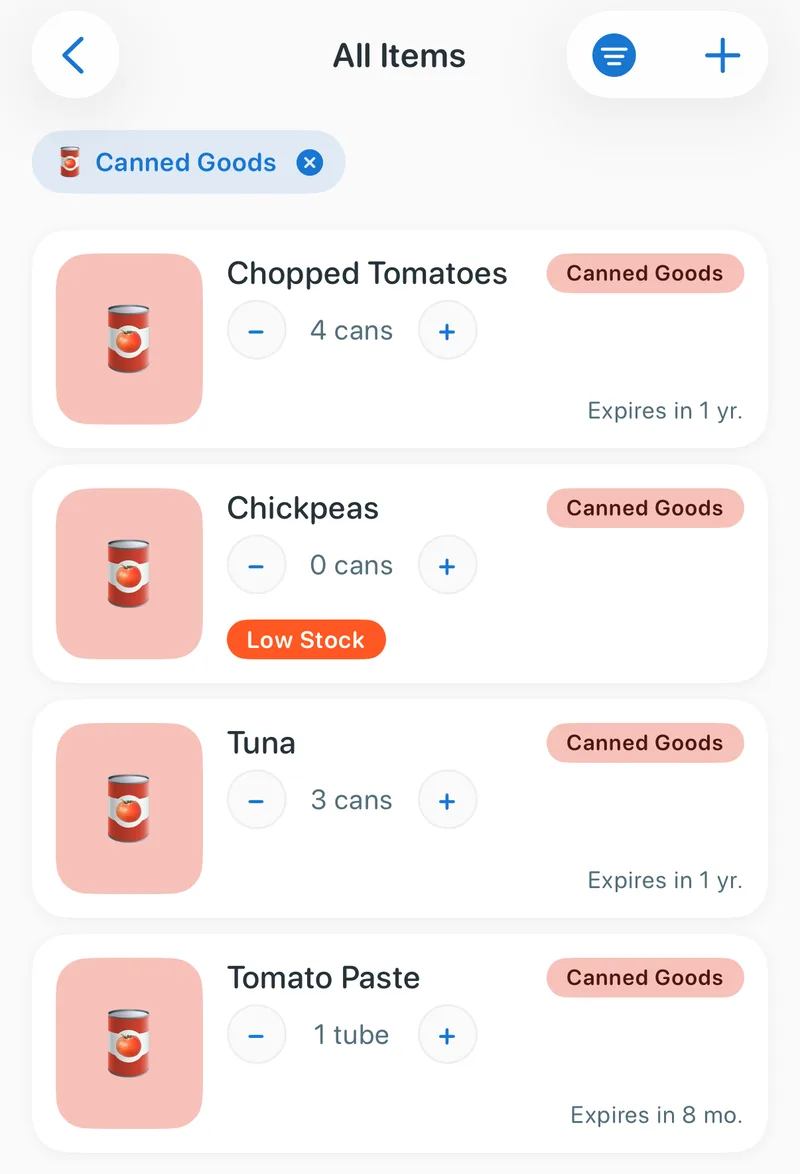
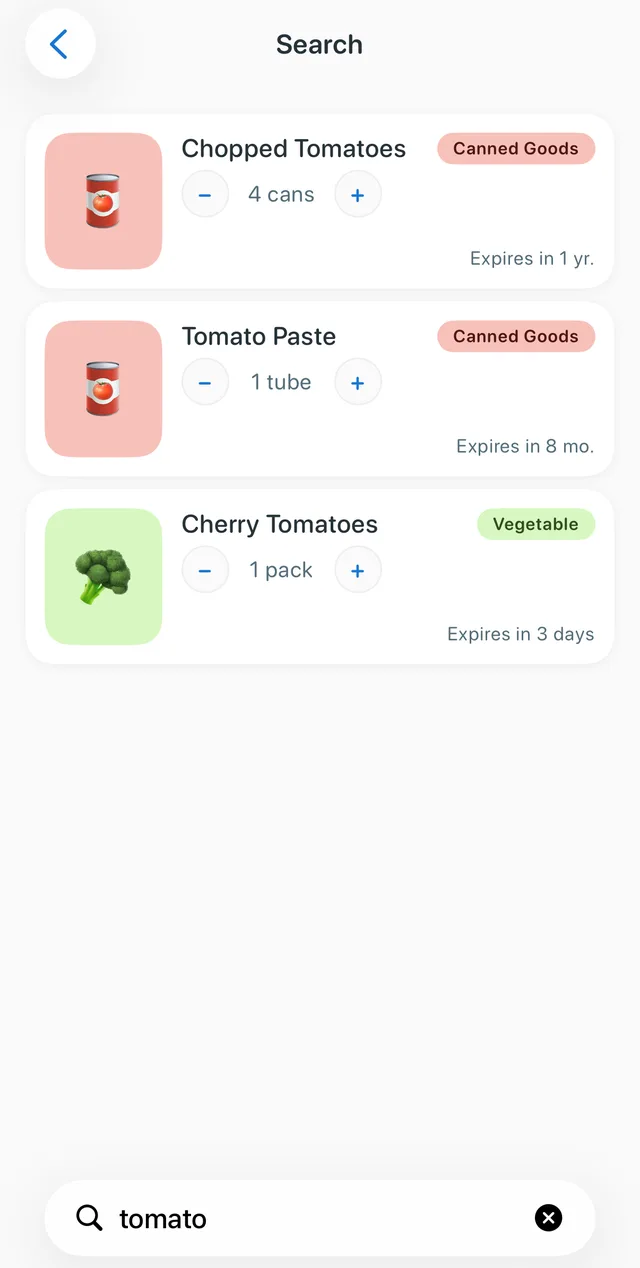
Panzy doesn't print or export the list, so if you want paper too, use the printable for the kitchen and the app for when you're out. The free version tracks up to 50 items, enough for the pantry staples you buy most. Panzy+ adds unlimited items, expiration reminders, the automatic shopping list, iCloud sync across your Apple devices, and no ads.
Panzy: pantry tracker
Track what's in your pantry, fridge and freezer, see what is expiring soon, and keep a shopping list that knows what you're low on. Free for up to 50 items.

Common questions
What should be on a pantry inventory list?
The shelf-stable food you buy regularly: canned goods, grains and pasta, baking supplies, breakfast foods, oils and sauces, spices, snacks and drinks. For each one, the item, the amount, the date on the package, and whether you need more. You can track fresh food on a separate sheet or in an app.
Is there a free pantry inventory template?
Yes. The printable above is free: a one-page PDF with nine categories and four columns. For a spreadsheet, copy the headers Category | Item | Qty | Best by | Buy into Excel or Google Sheets.
How often should I update my pantry inventory?
Each time food comes in or runs out, plus a quick read before every grocery shop. If it falls behind, recount one shelf at a time and print a fresh sheet.
Should I track expiration dates on a pantry list?
It helps you use the oldest food first, but don't treat it as a safety rule. According to the USDA, the dates on most packages are about quality, not safety. Write the date when it's easy to read and skip it when it isn't.